Ergonomics
Ergonomics is not just about tools or posture
The term “ergonomics” is derived from the Greek words ἔργον (érgon, work) and νομός (nomós, sharing). The concept and the idea behind ergonomics are rooted in the relationship between labor and the economy. The need to optimize ergonomics is thousands of years old. The key question is: how to make people and tools function as efficiently and safely as possible?
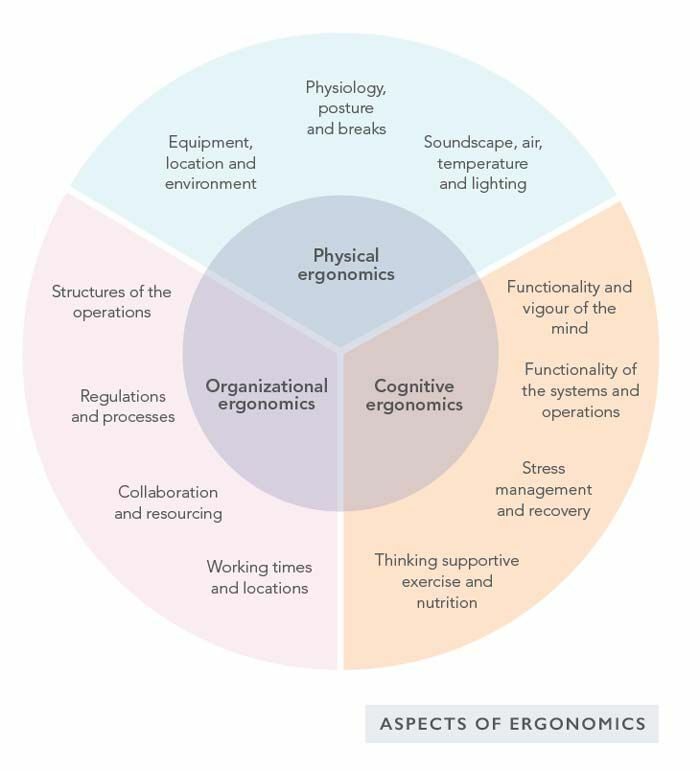
Ergonomics may be divided into physical, cognitive and organizational ergonomics (see image below). Going deeper, neuro-ergonomics utilizes knowledge of the human brain and neural function when designing user interfaces and systems.
HOW TO STAND PROPERLY?
If you have previously spent the whole working day sitting, the general recommendation is to change the standing position incrementally. A good start is to stand half the time – for example, you could stand for 30 minutes, followed by 30 minutes of sitting. Increase the proportion of standing incrementally until you stand (or walk) for most of the workday. Listen to your body – excessive standing can also cause physiological problems.
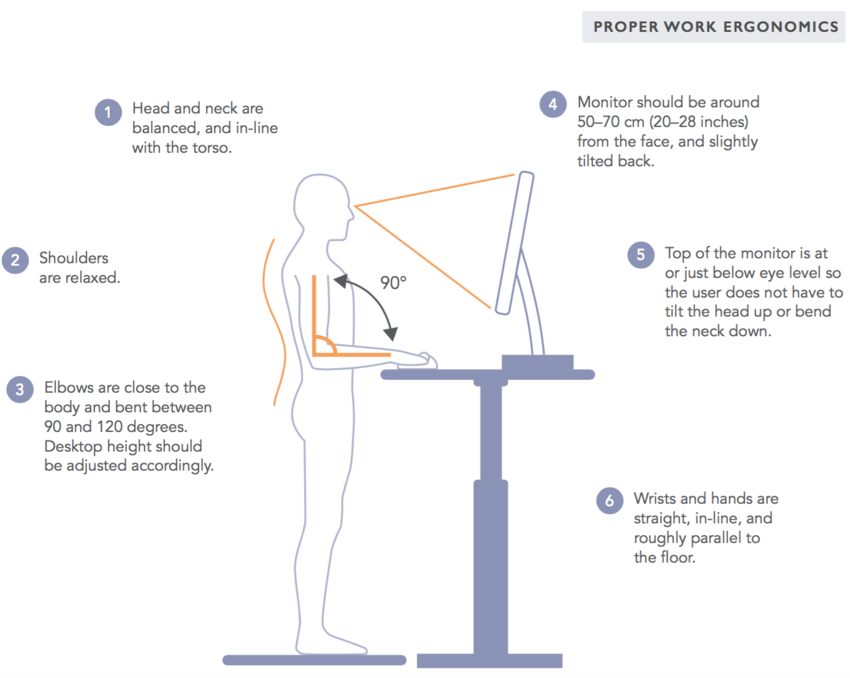
Point your toes straight and plant your entire feet firmly on the ground. At the same time, tighten your buttocks slightly and activate your abdominal muscles to maintain a stable and controlled position. Consciously practicing this position makes standing pleasant and more stable.
Try these when using a standing desk
- Roll your shoulders in both directions
- Stand on one foot
- Perform squats or stay in a squatting position for a moment
- Do push-ups, pull-ups, jumping jacks or burpees throughout the day
- Place one foot temporarily on a platform
- Move spontaneously (e.g. by changing the standing position or rotating joints)
- Do plank exercises to make standing easier
- Do kettlebell swings once per hour
- Occasionally use a bar stool or a saddle chair
- Shake and pat various parts of your body
- Massage the soles of your feet using a massage ball (e.g. an ice ball)
- Jump on a miniature trampoline or stand on a vibration plate once per hour
- Use a computer application that forces you to take breaks
HACK YOUR STANDING SURFACE
ANTI-FATIGUE MATS
Anti-fatigue mats are flexible and adaptable mats suitable for standing on at work. They force one to perform micromovements that improve balance and proprioception. Anti-fatigue mats also prevent lower back pain sometimes caused by standing, leg fatigue and swelling. In addition to anti-fatigue mats, many board-type products are available that improve balance and body control.
WALKING DESK
Professor Seth Roberts (1953–2014) inspired many health gurus to adopt a light and portable walking desk in the United States as early as 1996. Nathan Edelson, the original developer of the idea, had already published studies on the topic in the late 1980s. It was not until 20 years later that the first walking desk became available.
The user of a walking desk walks at a slow phase, typically 2–3 km/h (1.25–2 mph) while working on the computer. For example, the speed may be increased slightly during a conversation or a telephone call. One can easily walk up to 10 kilometers (6 miles) over a working day. The walking desk treadmill should be slightly inclined (1–3 degrees). This activates the gluteal muscles, which are utilized in all jumping movements.
GYMBA ACTIVATION BOARD
Gymba makes you more active, as it has been designed to help you stand up the right way. Using the board is simple: Place it under your feet, and that’s all there is. Gymba helps you balance your posture, adapting to your weight. You can continue working normally without worrying about overstraining your feet or back.
The recommendation is to use Gymba about half the time you spend at the workplace. After a few days of use, you should notice that your pains are dissipating, you are in better shape, your deeper muscles are getting exercise, and, as a result, the overall condition of your body is better.
Why sitting may destroy your health and discs?
In recent years, the health risks associated with sitting have been widely discussed in the media. It has been claimed that sitting too much is even more dangerous than smoking. Indeed, excessive sitting may increase the risk of cardiovascular diseases, metabolic syndrome, type 2 diabetes and various types of cancer (the last observed only in women).
When seated, the upper body's weight squashes many nerves and blood vessels in the thighs, buttocks, pelvis and genital areas.
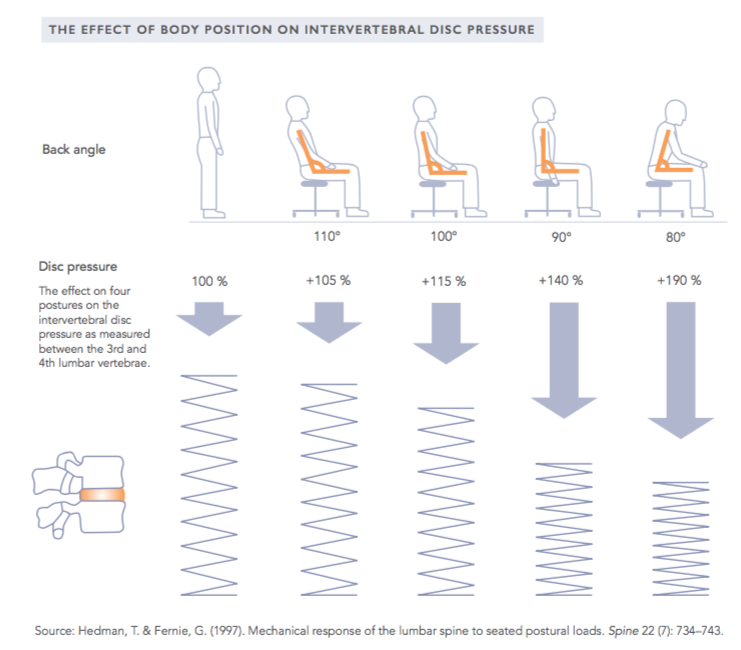
A good seat supports the upper body by the ischia instead of the muscles. The rear edge of the male pubic bone is located directly below the pelvis. To prevent the pubic bone from squashing crucial nerves and blood vessels in the genital area, men tend to unconsciously tilt their pelvis backward when sitting. As a result, the vertebrae of the lower back settle into a position that may cause deterioration of the lumbar spine.
Minimize the risks of sitting:
- Keep a sitting diary or wear an activity tracker to reduce the time spent sitting
- Do more work standing up and actively vary your working positions over the day
- Use an application that reminds you of short and long breaks from computer use
- If you do sedentary work, incorporate active movement into your breaks (e.g. jumping jacks, squats, push-ups or trampoline jumping – a vibration plate is also a feasible solution)
- When seated, use an adjustable saddle chair
- Move around when talking on the phone and schedule walking meetings whenever possible
BENEFITS OF SADDLE CHAIRS
A two-part saddle chair encourages both men and women to tilt their pelvis forward without feeling uncomfortable pressure on the pubic bone and genitals. This helps them maintain natural lordosis, the ideal posture of the spine. A two-part saddle chair effectively reduces pressure on the genital area and maintains a safe angle (135 degrees) between the thighs and the upper body.
The gap in the middle of the chair also prevents pressure from forming within the pelvis and the organs located in the pelvic area.
Right posture - more oxygen to the brain
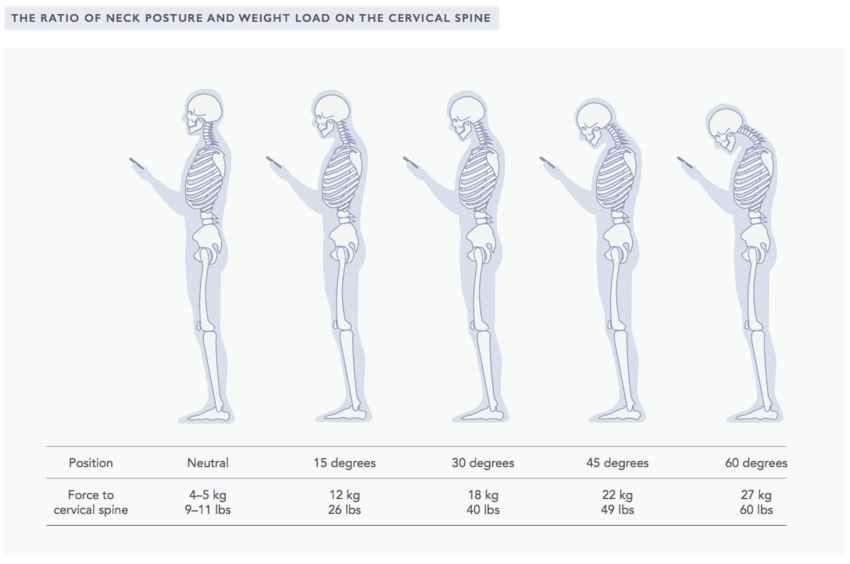
Talking on a cell phone, browsing social media and typing messages, in particular, frequently cause us to assume unnatural positions. Many people use their phones in a position where the cervical spine is bent forward. Holding one’s head at a 60-degree angle places the equivalent of a 60-pound (27 kg) weight on the cervical spine (see image above).
Over the years, this may cause significant deterioration of the cervical spine alongside other musculoskeletal ailments. Children as young as 7 have been found to have changes in the cervical spine caused by the typical “text neck”.
The Forward Head Posture (FHP) may also cause disorders in the function of the central nervous system. Poor cervical spine posture may also cause pressure in the carotid arteries and thus impair the circulation in the brain, causing the brain to have less oxygen at its disposal and therefore, impairing cognitive function.
Implement the following changes to optimize ergonomics when using a cell phone:
- Instead of typing, use voice control
- Avoid using a cell phone for extended periods
- Avoid browsing the internet and reading emails using the phone
- To rebalance after using a cell phone, straighten your neck, relax your shoulders, twist your thumbs upwards and breathe deeply
- Pay continuous attention to good posture and optimize the position in which you use your phone. Prop your elbows against your body and lift the phone to eye level.